COMPUTE NODES ONLINE

Free VPS for AI & Large Language Models

Run your own private AI. Our Free VPS for AI is custom-tuned for Ollama, DeepSeek-V3, and Llama 3. No credit card required. 180 days of high-frequency AMD Ryzen™ compute power.

Claim My AI Credits

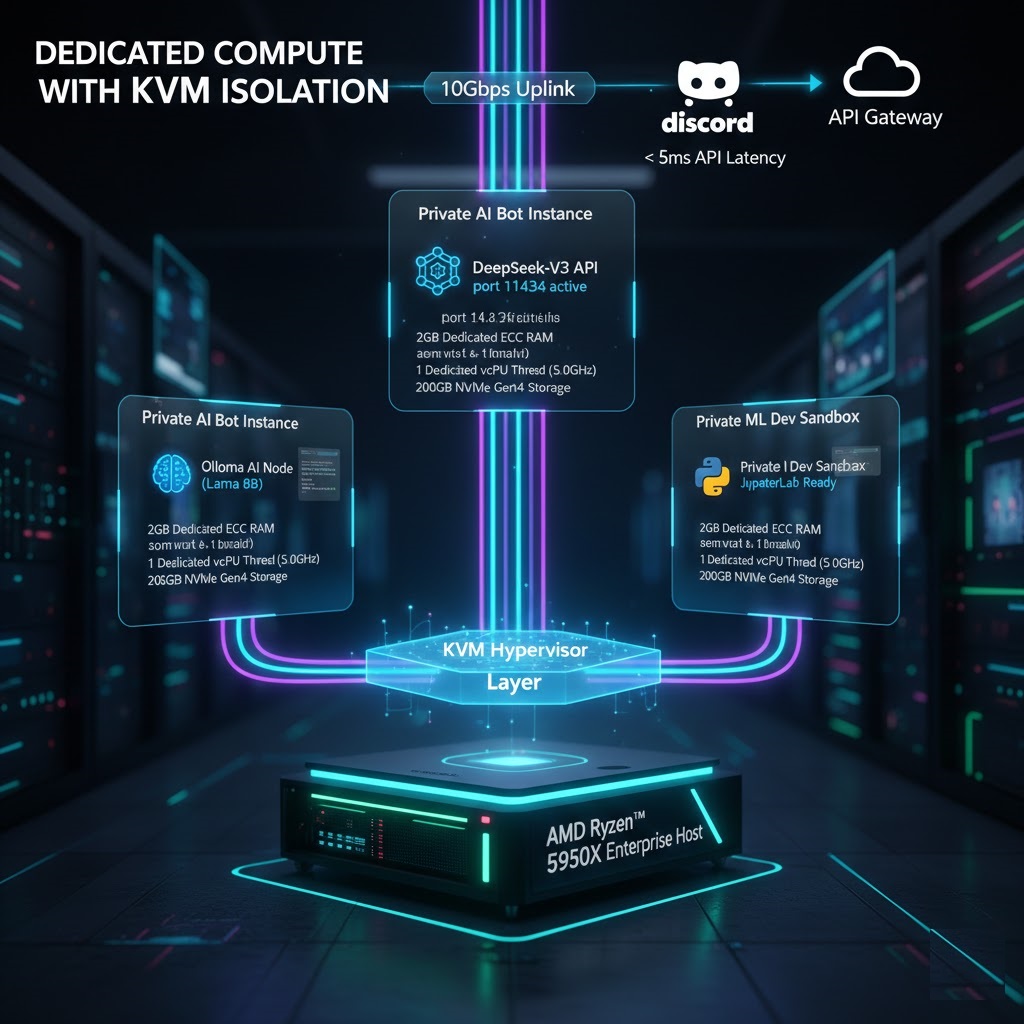
Dedicated Compute with KVM Isolation

AI inference requires constant CPU cycles. Shared container models (OpenVZ) fail when running LLMs because they throttle multi-threaded processes. Our Free VPS for AI uses KVM Virtualization to ensure your assigned Ryzen™ threads are 100% physically reserved.

  • AMD Ryzen 5950X: High-frequency inference speed.
  • NVMe Gen4: Microsecond weights loading.
  • 10Gbps Uplink: Fast dataset transfers.
Technical Diagram of Isolated KVM Resource Mapping for AI VPS

Run DeepSeek-V3 in 60 Seconds

Once you access your root SSH terminal, paste this command to install the Ollama engine and run your first model.

# Install Ollama Inference Engine
curl -fsSL https://ollama.com/install.sh | sh

# Run DeepSeek model
ollama run deepseek-v3

AI Model Compatibility List

Model Name Architecture Performance Status
DeepSeek-R1 (1.5B) MoE ⚡ Ultra Fast
Llama 3.2 (3B) Llama ✅ High Speed
Mistral (7B v0.3) Mistral 🛠️ Optimal (Quantized)

Local LLM Benchmark: Ollama vs. DeepSeek-R1

Optimized performance results on GratisVPS AI Nodes (Ryzen™ 5950X / 16GB RAM).

DeepSeek-R1 (Distill-Llama-8B)

Inference Speed: 12-15 Tokens/Sec
Ideal for: Advanced Reasoning & Logic.

Ollama (Llama-3.2-3B)

Inference Speed: 45+ Tokens/Sec
Ideal for: Real-time Chat & Summarization.

Advanced AI Optimization Tips

⚠️ Low Performance / High Latency?

Ensure you are using 4-bit Quantization (GGUF). Running full-precision models on a CPU-based VPS will cause bottlenecking. Use ollama run deepseek-r1:7b-q4_K_M for optimal speed.

🔒 Data Security & Privacy

To ensure your prompts remain private, run your VPS in Isolated Mode. Our KVM architecture prevents data leakage between virtual machines at the kernel level.

Pre-Configured AI Environments

Docker Ready

PyTorch/TF

llama.cpp

REST API

Full Model Context Protocol (MCP) Support

Enable your local AI to interact with external tools and datasets. Our VPS nodes fully support MCP implementations, allowing you to build AI agents that read from your databases and interact with webhooks in real-time.

AI MODELS
DeepSeek-R1
Ollama
Llama 3.2
Mistral v0.3
DEVELOPER OPS
Docker AI Containers
Python Inference
Node.js AI API
PM2 Bot Manager
LOCATIONS
Vienna AI Node
Toronto Compute
USA GPU Trial
Frankfurt LLM
PRIVACY
KVM Encryption
Zero-Logs AI
GDPR Compliant
Private Cloud

Zero-Trust Private AI Hosting

Unlike public AI services, your prompts and data never leave your isolated KVM environment. We provide a "sandbox" where your proprietary code and sensitive datasets remain 100% private.

  • Data Sovereignty: You own the logs and the model weights.
  • Kernel Isolation: KVM prevents cross-VM data leakage.
  • No Tracking: We never use your data to train public models.

Why Private LLMs are the 2026 Standard

Enterprise leaders are migrating to private cloud setups to ensure compliance with GDPR and HIPAA while gaining 10x faster access to internal knowledge bases.

CPU Inference Performance: Tokens Per Second

Benchmarks performed on our AMD Ryzen™ 5950X nodes using 4-bit GGUF quantization.

DeepSeek-R1 (1.5B)

~55 TPS

Lightning-Fast Interaction

Llama 3.2 (3B)

~25 TPS

Smooth Real-Time Chat

Mistral (7B v0.3)

~8 TPS

Standard Reading Speed

Turn Your VPS into a Private AI API

Use your free instance as a backend for Discord bots, websites, or mobile apps using the OpenAI-compatible API endpoint.

# 1. Expose Ollama to your network (Port 11434)
export OLLAMA_HOST=0.0.0.0

# 2. Call your model via CURL from any app
curl http://YOUR_VPS_IP:11434/api/chat -d '{
  "model": "deepseek-v3",
  "messages": [{"role": "user", "content": "Hello!"}]
}'

AI Hosting Frequently Asked Questions

Model Compatibility
1. Can I run DeepSeek-V3 or R1?

Yes. Our Ryzen nodes handle DeepSeek-R1 (Distill) models exceptionally well using 4-bit quantization.

Model Compatibility
2. Is Llama 3.2 supported?

Absolutely. Llama 3.2 (1B and 3B) runs at high token-per-second speeds on our unmanaged KVM instances.

Technical Specs
3. Is there a limit on API requests?

No. With full root access, you control the API. We do not throttle your requests or token counts.

Technical Specs
4. Do I get a dedicated IP for my AI API?

Yes. Every instance includes a dedicated static IPv4, allowing you to connect your local AI to external apps via webhooks.

5. Can I install Ollama?

Yes, Ollama is the recommended engine for our VPS. Install takes less than 60 seconds with our provided script.

6. Is FFmpeg available for AI audio processing?

Yes. You can install FFmpeg instantly via apt install to handle Whisper or audio-to-text tasks.

7. What quantization is best for this VPS?

We recommend Q4_K_M GGUF models for the best balance of speed and reasoning quality on CPU inference.

8. Is KVM virtualization guaranteed?

Yes. Unlike OpenVZ, KVM ensures your RAM is 100% reserved and cannot be "oversold" to other users.

9. Can I run Stable Diffusion?

Stable Diffusion runs in CPU mode, but for image generation, we recommend our specialized GPU tiers for faster rendering.

10. Do you log my AI prompts?

Never. Since you have root access and your own kernel, your data is 100% private and invisible to us.

11. Is Python 3.12 pre-installed?

Our Ubuntu 24.04 image comes with Python 3.12 ready for your virtual environments.

12. Can I use a Discord Bot with this AI VPS?

Yes. This is the #1 use case. You can host both the AI model and the Discord bot (Node.js/Python) on the same node.

13. How long does the 180-day trial last?

The credits are valid for 180 days from the moment of activation.

14. Is there DDoS protection?

Yes. We include RioRey enterprise-grade hardware protection to prevent attacks on your AI endpoints.

15. Can I use Docker for my AI stack?

Yes. KVM virtualization supports full Docker and Kubernetes deployments.

16. What is the network speed?

We provide a 10Gbps unmetered uplink to ensure your model downloads and API responses are lightning fast.

17. Can I upgrade to a GPU node later?

Yes. You can seamlessly migrate your data from the free CPU tier to our professional GPU clusters.

18. Do you support Model Context Protocol (MCP)?

Yes. You can implement MCP servers on your VPS to connect your AI to external datasets.

19. Is there a setup fee?

No. The AI trial is 100% free with no hidden setup or maintenance fees.

20. How do I get support?

We offer 24/7 technical support via our ticket system for all users, including the free tier.